

If you’re applying for or renewing your NBI clearance, paying the fee through GCash is one of the fastest and easiest methods. You don’t need to go to payment centers—everything can be done directly from your phone.
This guide will show you exactly how to pay NBI clearance using GCash, step by step, including requirements, QR method, bills payment method, and common issues.
What is NBI Payment via GCash?
Paying NBI clearance via GCash means using your mobile wallet to settle your application fee online. Once you complete your NBI application and get a reference number, you can pay instantly using the GCash app.
This method is widely used because it is:
- Fast
- Cashless
- Available 24/7
- Secure and trackable
Requirements Before Paying NBI Clearance Using GCash
Make sure you have the following ready:
- NBI reference number from your online application
- Active GCash account
- Enough balance in your wallet
- Stable internet connection
- Correct payment details (amount + reference number)
Without the reference number, you cannot proceed with payment.
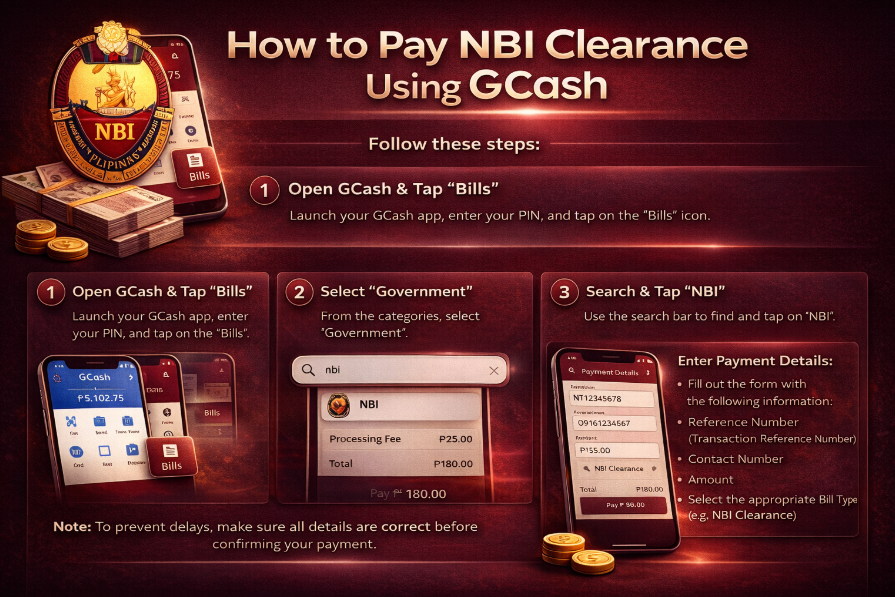
Method 1: Pay NBI Clearance Using GCash Bills Payment
This is the most common method.
Step-by-Step:
Step 1: Open GCash App
- Log in to your GCash account using your MPIN
Step 2: Tap “Bills”
- From the home screen, select Bills Pay
Step 3: Select “Government”
- Scroll and choose Government Services
Step 4: Choose “NBI”
- Find and tap NBI Clearance
Step 5: Enter Payment Details
You will be asked to input:
- Reference number (from NBI website)
- Amount to pay
- Your contact number
- Email address (optional in some cases)
Make sure everything matches your application.
Step 6: Confirm Payment
- Review details carefully
- Tap Confirm
- Enter your MPIN
Step 7: Wait for Confirmation
- You will receive an SMS or GCash receipt
- Your NBI payment status will update as “PAID” on the website
Method 2: Pay NBI Clearance Using QR Code (Fastest Method)
If the NBI system generates a QR code during your application, you can use this method.
Step-by-Step:
Step 1: Open GCash App
- Log in to your account
Step 2: Tap “Scan QR”
- Find the scan option on the home screen
Step 3: Scan NBI QR Code
- Point your camera at the QR code shown on the NBI payment page
Step 4: Check Payment Details
- Verify the amount and reference information
Step 5: Confirm Payment
- Tap pay and enter your MPIN
Step 6: Get Receipt
- Save the digital receipt for your records
NBI Clearance Fee (Estimated)
- Basic fee: around ₱130–₱160
- Additional service fee may apply depending on method
- Door-to-door or special services may cost more
Common Problems & Fixes
1. Wrong Reference Number
✔ Make sure you copy it exactly from the NBI website
✔ One wrong digit will fail the payment
2. Payment Not Reflected
✔ Wait 5–24 hours
✔ Check transaction history in GCash
3. “Invalid Details” Error
✔ Check format of reference number
✔ Ensure correct biller (NBI selected)
4. No QR Code Available
✔ Use Bills Payment method instead
Important Tips
- Always double-check your reference number
- Never use someone else’s NBI details
- Save your GCash receipt screenshot
- Pay immediately after generating appointment to avoid cancellation
Benefits of Using GCash for NBI Payment
- No need to visit payment centers
- Instant transaction processing
- Secure and official method
- Works anytime, anywhere
- Easy tracking of payment history
FAQs
Can I pay NBI clearance without GCash?
Yes, you can also pay via banks, 7-Eleven, or other payment centers.
How long does GCash payment take?
Usually instant, but confirmation may take a few minutes.
Can I reuse the same reference number?
No, each application has a unique reference number.
What if I enter wrong details?
Payment may fail or not reflect—always double-check before confirming.
Conclusion
Paying your NBI clearance using GCash is one of the easiest and most convenient methods in 2026. Whether you use the Bills Payment option or QR code scanning, the process is fast and secure as long as you enter the correct reference number.
Just follow the steps carefully, save your receipt, and you’re done in minutes.

A Senior SEO manager and content writer. I create content on technology, business, AI, and cryptocurrency, helping readers stay updated with the latest digital trends and strategies.